Client: “My business made 550k this year, what’s my tax rate?”
Tax Pro: “You’re in the 35 percent tax bracket.”
TaxFare.com Pro: “Wow. I just ran your numbers. Your True Marginal Tax Rate is 80%… and it’s not because you moved tax brackets” (hands them a graph modeling their situation)
Marginal tax brackets are not your True Marginal Tax Rate (TMTR). The real question clients want answered is “If I earn another dollar, how much do I actually keep?” That’s exactly how we define TMTR: the change in total tax due divided by the next dollar of income.
That is exactly what we do at TaxFare.com. Our calculator allows you to isolate a single variable, and run hundreds of scenarios instantly. The result is a graph of the TMTR across income levels, showing where deductions and credits phase out.
Phaseouts are effectively tax rate increases. During a phaseout range, the TMTR can be far higher than the bracket alone suggests. The only way to see this clearly is to model how tax changes as income increases.
What we consistently find is this: phaseouts matter, and overlapping phaseouts matter even more.
Example 1: The Extreme Triple Deduction Phaseout.
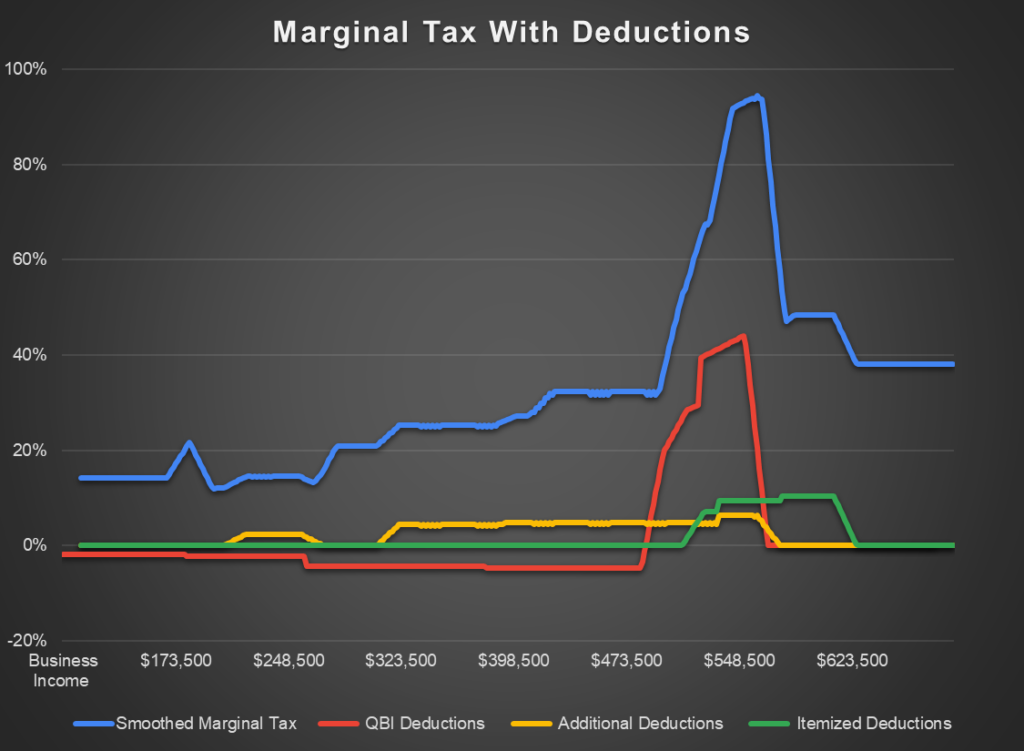
As we can see in the graph above, the True Marginal Tax Rate (blue) quickly shoots up past 80% at about $550k of business income. This is because QBI deduction, new additional deductions (tips, overtime, etc.) and itemized deductions (specifically the SALT deduction) all phase out in the same income range. This creates a perfect storm of phaseouts that greatly exceeds any tax bracket.
Example 2: EIC and Saver’s Credit.
This isn’t just helpful for high tax rates. Low and middle income taxpayers can see heavy spikes as multiple credits phase out.
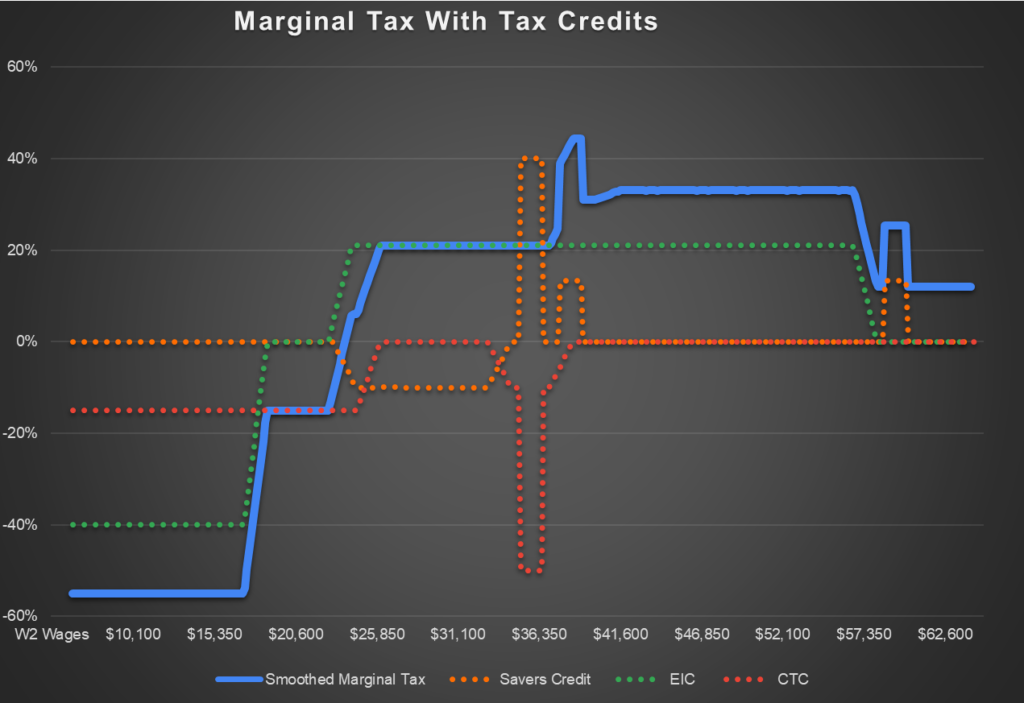
We can see negative TMTR at low income levels because the next dollar earned increases refundable credits. However, as EIC phases out, the TMTR spikes as high as 40% due to the 2nd cliff of the Saver’s Credit.
We can see the effects of cliffs here, where small changes in income can dramatically change the result. One item to point out is as the Saver’s Credit hits a cliff at around $38,000 of W-2 wages, the TMTR doesn’t change because the CTC makes up for the nonrefundable tax credit falling off.
Example 3: ACA Premiums… The PTC Cliff Problem.
While we are safe in 2025 from the huge cliffs that will be back in 2026 (if nothing changes), the minimum payback amounts and ACA premiums in general can wreak havoc on those expecting tax rates to be a steady line. Below are the 2025 numbers.
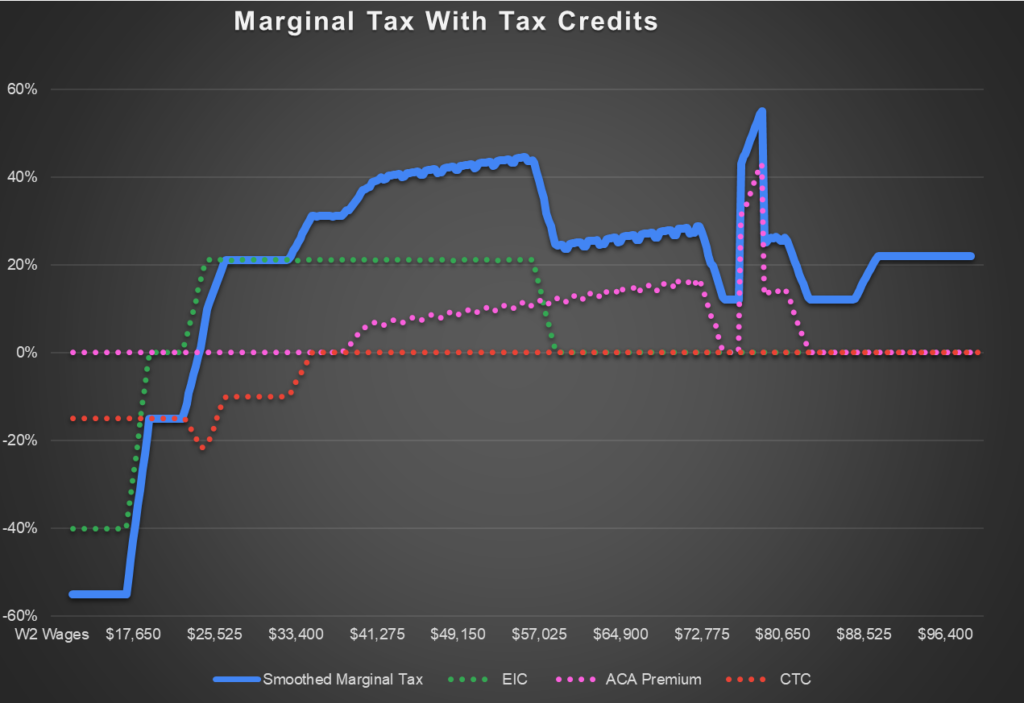
Not all phaseouts behave like smooth ramps. The Premium Tax Credit is the most common source of client whiplash. Because eligibility and subsidy amounts are highly sensitive to household income, relatively small changes can lead to large repayment obligations.
Planning Without Guessing.
This is where proactive modeling beats your instinct or post hoc explanations.
Our Tax Planning Calculator lets you test scenarios quickly and see how after-tax outcomes change from the real variables people care about, not just AGI. You can model questions like:
- What if income was 50% higher or lower than expected?
- What’s the tax value of a large purchase at the end of the year?
- What if we adjust retirement contributions to manage AGI?
By modeling income changes across a range, you can identify phaseout exposure early, anticipate cliff-risk areas, and quantify trade-offs before the client is surprised at filing time.
The tax rate people care about is not the number in the bracket table. It is the rate that applies to the next dollar. That’s the True Marginal Tax Rate. Once you can see that clearly, better planning decisions follow.
Graph input details:
Example 1:
2025
Schedule C income 100k-700k
MFJ, 2 Children
50k of State Taxes and Local Taxes
25k Mortgage interest
10k charity
Qualified OT: 25k
Qualified tips: 25k
Qualified Vehicle Interest: 10k
Example 2:
2025
W2 Income $5,000 – $65,000
HOH, 2 Children
Saver’s Contribution $2,000
Example 3:
2025
HOH, 2 Children
W2 Income 10k-100k
ACA Total Premiums $12,000
ACA SLCSP $10,000
ACA Advance $8,000